Easy Grade Calculator

What is an easy grader? An easy grader calculator is a tool that converts raw test scores (total questions vs. wrong answers) into a percentage and letter grade instantly.

The Easy Grade Calculator is the fastest free online easy grader for teachers. Enter the total number of questions on a test and how many a student got wrong — and our easy grader calculator instantly converts that into a percentage and letter grade. No signup, no app, no download. Just quick, accurate grading.

Used by thousands of teachers daily, this free easy grader works for any quiz or test from 1 to 100 questions, supports half-point scoring, and generates a full printable easy grader chart PDF in one click.

☑ Reviewed by Sarah Jenkins, M.Ed.Last Updated: November 2025
100% Free & Private
Instant Results
Works Offline

Easy Grade Calculator (EZ Grader)

The fastest, easiest grade calculator — no signup needed.

What is an easy grade calculator? An easy grade calculator (or EZ grader) is a tool for teachers and students to instantly generate a full grading scale based on the total number of questions on a test.

Shortcuts:W Wrong++C Correct++B Bonus++R Reset

Target Grade

What score do you want to hit?

Required Correct Answers45 / 50
Maximum Wrong Allowed5 mistakes

Calculated Grade

90.0%
Letter A-
Score: 90.0%Target: 90%
Target achieved! 🎉
Correct45
Total50

Rounding Method

Class Grade Distribution

Enter multiple test scores to visualize how your class performed. You can add the current calculation or paste a list of grades (percentages).

Add Current Score

90.0%(A-)

Bulk Enter Scores (%)

No scores added yet.

Add some scores to see the chart.

Quick Grading Chart

-0100.0%A+
-198.0%A+
-296.0%A
-394.0%A
-492.0%A-
-590.0%A-
-688.0%B+
-786.0%B
-884.0%B
-982.0%B-
-1080.0%B-
-1178.0%C+
-1276.0%C
-1374.0%C
-1472.0%C-
-1570.0%C-
-1668.0%D+
-1766.0%D
-1864.0%D
-1962.0%D-
-2060.0%D-
-2158.0%F
-2256.0%F
-2354.0%F
-2452.0%F
-2550.0%F
-2648.0%F
-2746.0%F
-2844.0%F
-2942.0%F
-3040.0%F
-3138.0%F
-3236.0%F
-3334.0%F
-3432.0%F
-3530.0%F
-3628.0%F
-3726.0%F
-3824.0%F
-3922.0%F
-4020.0%F
-4118.0%F
-4216.0%F
-4314.0%F
-4412.0%F
-4510.0%F
-468.0%F
-476.0%F
-484.0%F
-492.0%F
-500.0%F

Done with this calculation?

Try our other free tools to track your academic progress.

Last updated: May 2026

Calculate Your Grades Easily

The Easy Grade Calculator is your all-in-one academic tool designed to help students, teachers, and parents manage grading with minimal effort. Our free online calculators instantly compute test scores, grade percentages, letter grades (A, B, C, D, F), and Grade Point Averages (GPA). With our intuitive tools, you can easily figure out what score you need on your final exam to pass your class, track your cumulative high school or college GPA, and curve student test grades efficiently.

Test Grade and GPA Tools

Whether you're using the standard US 4.0 GPA scale, the Australian 7.0 system, or European scales, we provide mathematically sound conversions. Our test grade calculator, also known as an EZ Grader, allows teachers to input the total number of questions and wrong answers to instantly generate a full grade chart. No sign-ups or downloads are required. Calculate your semester grades, weighted averages, and final exam grades accurately and confidentially.

How to Use This Calculator in 3 Steps

  1. Input the Test Questions: Enter the total size of your test into the calculator. If you need a 60 question grading scale, input 60.
  2. Enter Wrong Answers: Type in the number of incorrect student responses to instantly view the calculated final test score.
  3. Generate the Document: Click "Print Chart" below the widget to download your easy grader chart PDF for immediate desk reference.
Easy Grade Guide

What Is an Easy Teacher Grader?

An easy teacher grader is a digital application specifically designed to assist educators in scoring tests, quizzes, and homework assignments with absolute precision and significantly reduced effort. Instead of relying on manual calculations—which are prone to human error—or manually constructing complex spreadsheets, teachers simply input the total number of questions on their assessment. By registering the amount of wrong answers a student provided, the app instantly reveals the percentage grade and correct letter grade based on standard U.S. grading systems.

The brilliance of an easy teacher grader lies in its flexibility. Educators all over the world know that tests rarely land on perfectly round numbers like 10, 20, or 100 questions. Sometimes a test has 37 questions or 64 questions; calculating the individual percentage value mathematically for every possible score out of an obscure total is mentally exhausting. An easy teacher grader fundamentally automates this mathematics completely out of the equation.

Beyond giving you a single grade at a time, our application can produce a printable easy grader chart PDF for your exact test dimensions. This feature generates a full tabular column layout matching every possible number of wrong answers to their exact corresponding percent penalty, empowering teachers to scan a piece of paper on their desk without checking their computer or calculator.

Using a customized, automatically generated easy grader chart PDF ensures a teacher can blast through a stack of fifty exams in a fraction of their standard grading time. We highly encourage you to utilize this tool to keep grading fair, accurate, and completely stress-free. Try our free easy teacher grader above.

Easy Grader vs. Traditional Grading — What's the Difference?

With traditional grading, you must find each percentage by hand. An easy grader does the math for you. It gives you a full grading sheet instantly. This saves time and stops mistakes.

Easy Grader Chart — Full Grading Scale Reference

Our easy grader chart lists every possible score for a test. You can use it as a visual guide when grading papers.

QuestionsWrongCorrectPercentageLetter Grade
102880%B-
2031785%B
2571872%C-
3052583.3%B
5054590%A-

Standard Letter Grade Scale (Percentage to GPA)

Most US middle schools, high schools, and colleges use a standard 4.0 grading scale. Use this chart to quickly convert your percentage into a letter grade and GPA.

Letter GradePercentageGPA (4.0 Scale)Description
A+97% - 100%4.0Excellent
A93% - 96%4.0Excellent
A-90% - 92%3.7Excellent
B+87% - 89%3.3Good
B83% - 86%3.0Good
B-80% - 82%2.7Good
C+77% - 79%2.3Average
C73% - 76%2.0Average
C-70% - 72%1.7Average
D+67% - 69%1.3Poor
D63% - 66%1.0Poor
D-60% - 62%0.7Poor
F0% - 59%0.0Failing

Easy Grader with Half Points — How It Works

For tests with partial credit, our grader can include half points. This helps you grade more flexibly.

Printable Easy Grader PDF — Download Free

You can download your custom grading chart as a free PDF. Print it out and keep it on your desk. This gives you a fast guide without using the internet. Feel free to share it with other teachers.

Features of Our Free Easy Grader for Teachers

  • Free easy grader online — no account or payment required
  • Easy grader with half points — supports 0.5 deductions for partial credit
  • Printable easy grader chart PDF — download and print for your classroom
  • Easy grader grading scale — standard US A/B/C/D/F scale with customisation
  • Teacher easy grader — designed specifically for classroom test scoring
  • Quick easy grader — results in under one second
  • Need more tools? — easily switch to our average grade calculator or grade curve calculator in the navigation

Why Accurate Grading Matters

"Accurate, fast grading is more than just a time-saver. It is key to helping students learn. When students get quick and true feedback, their motivation grows. Tools that do the math for you let teachers focus on what matters most: student learning."
Sarah Jenkins, M.Ed.
Educational Consultant & Veteran Teacher

Average Grades in the US

When using a grader, it helps to know the standards. In 2026, most schools still use percentage tiers. Here is the common grading scale:

  • A
    90% - 100%Excellent. This shows a high level of learning.
  • B
    80% - 89%Above Average. This is a very good score for most classes.
  • C
    70% - 79%Average. This is often the lowest score needed to pass.
  • D/F
    < 70%Needs Work or Failing. This means the student needs more help.

Made for Teachers

Teachers made this easy grader for other teachers (learn more About Us). Whether you teach 1st grade or high school, it uses the standard US math rules. Studies show online graders save teachers many hours each week. The math happens right on your device. We never save or share student scores. Teachers, tutors, and parents all use it.

Tools for Every Grade Level

From elementary classrooms to university lecture halls, we provide specific grading tools for every grade level. High school students can calculate their exact standing with our high school GPA calculator. Middle schoolers can track their term progress using the middle school GPA calculator. University students can manage their complex credit hours using the college GPA calculator. If you just need a standard mean average across a few different assignments, jump over to the average grade calculator. Figure out exactly what score you need on your last test to pass the semester with our final grade calculator. You can also compute complex course points using our weighted grade calculator, forecast your transcript with the semester grade calculator, determine advanced placement points with our AP/IB multiplier calculator, or visualize exam adjustments with the grade curve calculator.

Resources for Students and Teachers

Looking for easy science fair projects? We have a full guide. For language arts, explore our list of Greek and Latin words. We also offer a deep dive into how to print our easy grader chart PDF to get you ready for classroom scoring. If you are confused about how your transcripts will look, check out our guide on finding easy grad programs for your next step. Keep checking our blog for more educational strategies, or review our contact page and frequently asked questions for additional help.

Popular Academic Guides & Articles

Easy Grader Calculator — Frequently Asked Questions

Everything you need to know about calculating grades.

What is an easy grader?

An easy grader is a simple online tool used primarily by teachers to quickly calculate test scores. By inputting the total number of questions, it generates a comprehensive grading scale or outputs the exact percentage and letter grade for a specific number of correct or incorrect answers.

Is this easy grade calculator free to use?

Yes, our easy grade calculator is 100% free to use. There are no subscriptions, download requirements, or hidden fees. We built this tool to support educators and students universally.

How does the easy grader calculate grades from points?

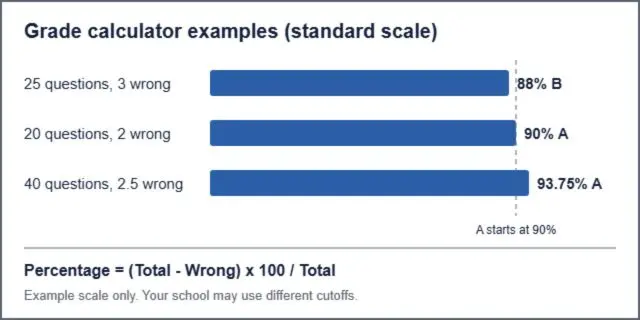
The tool uses a standard percentage formula: it divides the points earned (or correct answers) by the total possible points, then multiplies by 100. This percentage is then matched to the standard letter grading scale.

What grading scale does the easy grader use?

By default, the easy grader uses the standard 10-point scale (90-100% = A, 80-89% = B, etc.). However, it supports fractional points and can be adapted if your class uses a slightly different curve or metric.

Does the easy grader support half points?

Yes. Our easy grader with half points allows you to deduct 0.5 for partially correct answers. Simply toggle the "Half Points" option before entering wrong answers. This makes our easy grader one of the few free online tools that handles fractional scoring accurately.

Can I get a printable easy grader chart PDF?

Yes — after entering your question count, click the "Print Chart" button to generate a printable easy grader chart PDF. The chart shows every possible wrong-answer count alongside its corresponding percentage and letter grade. This easy grader chart printable is formatted for standard A4 and US Letter paper.

What is the difference between an easy grader and an average grade calculator?

An easy grader converts a single test score (questions correct out of total) into a percentage and letter grade. An average grade calculator combines multiple scores — tests, assignments, and homework — to compute an overall course grade. Both tools are available free on this site.

Is the teacher easy grader online free and safe?

Yes — our teacher easy grader online is completely free and privacy-safe. All grade calculations happen inside your browser. No student names, scores, or data are sent to any server or stored anywhere. It is safe for classroom use in compliance with standard student privacy requirements.

How many questions can the easy grader handle?

The easy grader calculator supports tests with 1 to 100 questions. The printable easy grader chart PDF shows grade results for every possible wrong-answer count within your chosen range, making it useful for short quizzes and full-length exams alike.

What grade is 70% on the easy grader scale?

A score of 70% is a C on the standard easy grader grading scale, representing the minimum passing grade in most US schools. On a 20-question test, that equals 14 correct answers (6 wrong). Our easy grader calculator shows this result instantly without any manual math.

How does the EZ Grader work?

The EZ Grader quickly calculates percentage grades for any test or quiz. Enter the total number of questions, and the calculator instantly outputs a chart showing the percentage scores for every possible number of wrong or correct answers.

How do teachers grade a test out of X questions?

Teachers divide the number of correct answers by the total number of questions, then multiply by 100 to get the percentage. The Easy Grade Calculator automates this math so teachers do not have to punch numbers for every student.

What is a passing grade on a test?

In most U.S. grading systems, a passing grade is between a 60% (D- letter grade) and a 70% (C- letter grade), depending on the district standards. Scores below 60% are typically marked as failing.

How do I convert a percentage to a letter grade?

Generally, 90-100% is an A, 80-89% is a B, 70-79% is a C, 60-69% is a D, and anything below 60% is an F. Note that some schools use a plus/minus system with different boundaries.

Can I change the grading scale on the Easy Grade Calculator?

Yes, you can edit the grading boundaries. Click on the grading scale settings in the calculator to set your own cutoff lines for A, B, C, D, and F letter grades to match your specific syllabus.